


NIU
3.5275.00 Reviews
App Specs
- Version
- 5.12.2
- Updated On
- License
- Free
- Downloads
- 100,000+
- Developer
- NIU Technologies
- Categories
- Auto & Vehicles
- Platform
- Android
Screenshots
 Analysis by AppCompare
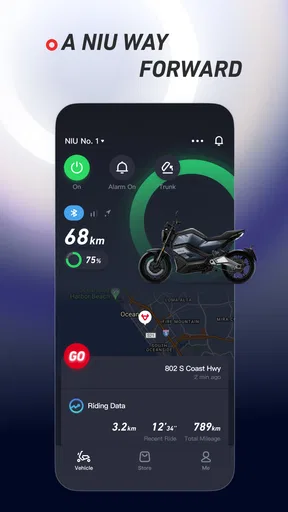
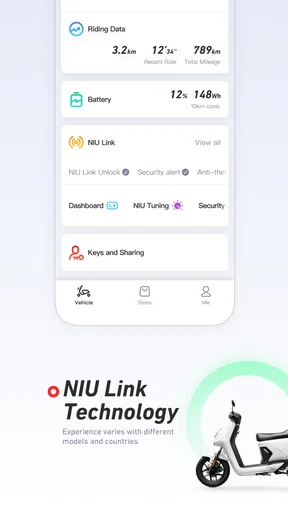
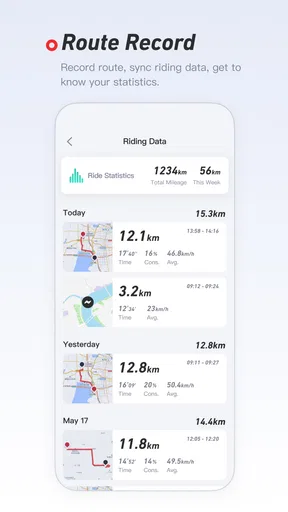
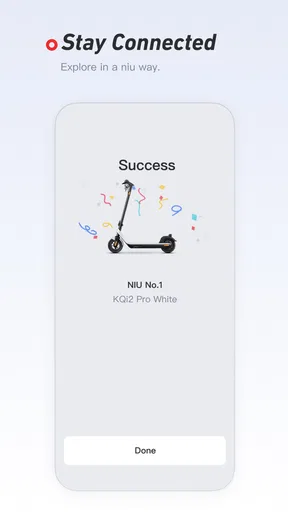
I judge a vehicle companion app by whether it helps me make a clear decision before I set off, not by how many screens it can fill. NIU is a free app from NIU Technologies in the Auto & Vehicles category, intended to help owners keep an eye on their scooter’s status. That focused role can be useful when I want a quick check rather than a broad collection of travel tools. It is not a general scooter-control or route-planning app by default; its value is tied to having a compatible NIU scooter and using the information it offers as one part of a safe ride routine.
Readability and navigation in everyday checks
When I open a vehicle app, I want to find the information I need without hunting through menus while standing beside a scooter. A status-monitoring companion has a naturally practical job: help me check in, understand whether anything needs attention, and get back to preparing for the trip. That makes a clear layout more important than decorative extras. My advice is to keep the app’s role simple in your mind: use it as a scooter companion, not as a replacement for the judgment you use when inspecting the vehicle in person.
There is also a useful difference between a quick glance and a full review. Before leaving home, I can give the app a moment to load and read what it presents, then decide whether I am ready to go. If I am rushed, trying to interpret a screen while walking through a busy parking area is a poor trade-off. I would rather stop somewhere safe, check calmly, and then put the phone away. This small habit matters for anyone who finds small text, dense screens, or frequent phone interaction tiring.
Motor and sensory considerations
A phone-based scooter companion can reduce some physical effort: I may be able to check the scooter’s status without repeatedly moving around it or bending to inspect every part. That can make routine ownership easier for riders with limited mobility, fatigue, or discomfort. Still, an app cannot substitute for hands-on tasks that require a physical inspection, and I would not treat a reassuring screen as proof that every component is safe. If a warning appears or the scooter feels unusual, I would stop and investigate rather than rely on the app alone.
For sensory needs, the most comfortable approach is to make checks in a quiet, well-lit place and avoid depending on the display while moving. I also recommend turning the check into a predictable routine: open the app, review the status, close it, then focus on the ride. A phone screen can be hard to read in bright light or distracting when notifications compete for attention. Riders who prefer spoken instructions, large text, or other specific accessibility tools should consider how their own device settings work with the app before relying on it for an important trip.
Situational access: when a check is useful
One ordinary example is a commute after the scooter has been parked for several hours. Before heading back, I can check its status while still somewhere safe, then decide whether to continue with my planned trip or allow time to deal with a concern. The benefit is less about saving a dramatic amount of time and more about making the check part of a calmer routine. That can be especially helpful when the scooter is used for errands, commuting, or other trips where an unexpected issue would disrupt the day.
It is also worth thinking about where the phone is used. If I am carrying bags, helping someone, or dealing with poor weather, I do not want a process that demands prolonged attention. I would check before I leave a sheltered place, rather than trying to navigate the app beside traffic or in the middle of a crowded sidewalk. For riders who share a scooter, the app is most useful when each person understands which account and device they should use, and who is responsible for checking before a journey.
Worth Reading Before You Choose

EA SPORTS FC Mobile 26 Is a Bigger Football Game, but It Takes Time

Flipboard Shows What News Apps Must Do Beyond the Feed

Switching to Android Auto Means Rethinking Your Driving Routine

Google Calendar Makes a Crowded Week Easier to Manage

Ludo King Makes the Most of the Minutes Between Plans

Baby Panda World Brings Quick Play to Modern Phones, but Its Game Library Feels Busy
Where it fits among vehicle apps
Compared with a general map app, NIU serves a narrower purpose: it is about the scooter’s status, while maps are better for choosing a route and finding a destination. A manufacturer’s companion app can put vehicle-related information closer to the owner, but it is less useful to someone who does not ride a compatible NIU scooter. If you mainly need navigation, a mapping app is the better starting point. If you want a broad service or maintenance log, a dedicated record-keeping tool may suit you better; those tools organize ownership information rather than replacing a live scooter check.
I would use the apps as complements, not competitors. A sensible sequence is to check the scooter first, choose a route in the navigation app, and then leave the phone alone while riding. This avoids expecting one app to handle every part of a trip. It also helps answer a common practical question: should this replace the tools already on my phone? In my view, no. It is most compelling as a focused companion for a NIU scooter, with maps and other planning tools kept for the jobs they already do well.
Who will benefit, and who can skip it
The app makes the most sense for an owner who wants a convenient way to monitor a NIU scooter and is comfortable checking a phone before a ride. It may also suit someone who is learning to build a consistent pre-ride routine, because opening the same companion each time can serve as a reminder to pause and check. NIU has an average rating of 3.7 from around 3.9 thousand ratings, and it has more than 100 thousand installs. Those figures suggest an established audience, but they do not tell me whether the app will fit every scooter, phone, or personal routine.
I would skip it if I do not own a compatible NIU scooter, if I only want directions, or if I prefer to keep vehicle checks entirely offline. It is also not the right answer for someone who expects an app to diagnose every mechanical problem or guarantee that a scooter is ready to ride. The key question is whether you will actually use a digital status check. If you would open it regularly, the focused purpose may justify keeping it installed; if not, a general navigation app and a consistent physical inspection may be enough.
Practical limits and a more dependable routine
A connected status view is only helpful when I can access it at the right moment, so I would avoid making it the sole basis for a time-critical decision. A phone may be unavailable, its battery may be low, or the app may not be ready when I want to check. That is why I would keep the basics of safe scooter use independent of the screen: look over the vehicle, pay attention to how it feels, and take any unusual behavior seriously. The app can make a routine more convenient, but it should not make that routine less careful.
One practical tip is to check the app at home or in another safe place, rather than waiting until I am already in a hurry to depart. Another is to make sure the phone itself is usable for the task: keep its screen clean, avoid juggling other notifications, and do not try to read it while riding. These are small choices, but they reduce the chance that a useful tool becomes a distraction. I would also treat the app’s information as a snapshot to help guide attention, not as a reason to ignore a physical symptom.
The app is free, rated for Everyone, and its current version is 5.12.2, with Android 8.0 as the minimum operating-system requirement. It was released on August 18, 2016, and the developer is NIU Technologies. For a potential user, the practical point is straightforward: check that your phone can run it and that you have a reason to use a NIU-specific scooter companion. The age rating makes it broadly suitable in that respect, though younger riders still need appropriate supervision and safe riding habits.
An inclusive verdict on access and usefulness
What I value most about a scooter-status app is the chance to make ownership a little more informed without adding a complicated ritual. NIU’s focused purpose can support riders who want a convenient check-in, including people who find repeated physical checks uncomfortable. At the same time, phone use, screen readability, and the need to interpret information can create friction for other riders. I would try it in the actual places where I ride and park, then decide whether it makes my routine easier rather than assuming it will suit every ability or situation.
My recommendation is conditional but clear: if you ride a compatible NIU scooter and want a digital way to monitor its status, this is a sensible companion to consider. If your main need is route guidance, broad vehicle records, or a substitute for hands-on checks, another tool or a different routine will serve you better. The app’s job is narrow, and that is both its strength and its limit. Used calmly before a journey, it can be a useful part of scooter ownership; treated as a complete safety solution, it asks more of itself than it should.
What is NIU?
NIU is essentially a productivity powerhouse packed into a sleek and user-friendly app. Designed for both Android and iOS, it combines task management, note-taking, and scheduling into one convenient package. For those of us who tend to have a million tabs open in our brains, NIU offers a refreshing way to streamline our daily hustle.
First Impressions
The first thing I noticed about NIU is its minimalist design. The interface is clean and intuitive, making navigation a breeze. Unlike some apps that bombard you with features and buttons, NIU keeps it simple. Everything feels just a tap away, which is perfect when you’re on the go.
Setting up the app was straightforward. After downloading it from the app store, you’re prompted to create an account or log in with existing credentials. The onboarding process is smooth, and the app does a great job of guiding you through its main features without any overwhelming jargon.
Features that Stand Out
One of my favorite features in NIU is its task management system. You can create tasks with deadlines, set priority levels, and even categorize them into different projects. It’s like having a personal assistant in your pocket. The ability to drag and drop tasks to reorder them is a sweet touch, making it easy to adapt to changing priorities.
The note-taking function is another highlight. I’m a serial note-taker, and NIU’s interface makes it easy to jot down thoughts or ideas quickly. You can organize notes into folders, tag them for quick searchability, and even attach images or files if needed. It’s a versatile tool that has replaced my need for a separate note-taking app.
Scheduling Made Easy
NIU’s calendar integration is also worth mentioning. Syncing with my existing calendar was seamless, and having everything in one place means I’m less likely to double-book myself (a regular occurrence in my chaotic schedule). The app sends you reminders for upcoming tasks and events, which is a lifesaver for someone like me who tends to forget things.
One feature that’s particularly nifty is the ability to set recurring tasks. Whether it’s a weekly meeting or a monthly report, NIU handles it all. You can customize the recurrence settings to fit your needs perfectly.
Personal Touch
What I love about NIU is the personal touch it brings to productivity. The app allows for customization in terms of themes and layouts, making it feel more personal and tailored to your style. You can adjust settings to receive motivational quotes or tips, which is a nice touch for those days when you need an extra push.
Another cool feature is the ability to collaborate with others. Sharing tasks or notes with colleagues or friends is straightforward, and it’s perfect for group projects or planning events. You can assign tasks to others and track progress, making teamwork more efficient.
Final Thoughts
After spending some quality time with NIU, I can confidently say it’s a must-have for anyone looking to boost their productivity. Its combination of task management, note-taking, and scheduling makes it a versatile tool for both personal and professional use. The user-friendly interface and customization options are just the cherry on top.
If you’re ready to streamline your life and keep your tasks in check, give NIU a try. It’s available for download on both Android and iOS, so no matter what device you’re using, you can experience the magic of having a productivity powerhouse right at your fingertips.
Pros
- User-friendly interface with intuitive navigation.
- Wide range of customization options available.
- Seamless integration with other apps and services.
- Efficient performance with minimal lag.
- Regular updates enhance features and security.
Cons
- Limited offline functionality for key features.
- Requires constant internet connection.
- Some features locked behind a paywall.
- Occasional ads can disrupt user experience.
- Initial setup can be time-consuming.
FAQs for NIU
What is NIU and what features does it offer?
NIU is a comprehensive productivity app designed to streamline daily tasks, manage schedules, and enhance collaboration. It offers features such as task management, calendar integration, file sharing, and team communication tools. Users can customize their dashboards and sync across devices for seamless access, making it ideal for both individual and team use.
Is NIU available for both Android and iOS devices?
Yes, NIU is available for both Android and iOS platforms. The app can be downloaded from the Google Play Store for Android devices and the Apple App Store for iOS devices. It ensures a consistent user experience across different operating systems, allowing cross-platform collaboration and data synchronization.
Does NIU require an internet connection to work?
While NIU offers offline capabilities for certain features, such as viewing and editing previously synced tasks or files, an internet connection is required for real-time updates and collaboration. To make the most of its collaborative features, such as team chats and file sharing, a stable internet connection is recommended.
Is there a free version of NIU, or does it require a subscription?
NIU offers a free version with basic features suitable for individual use. However, for advanced features such as expanded storage, team collaboration tools, and priority support, users can opt for a premium subscription. The subscription is available on a monthly or annual basis, with different tiers to suit various needs.
How secure is my data on NIU?
NIU prioritizes user data security by employing strong encryption protocols and secure data centers to protect user information. It also offers two-factor authentication for additional security. Users can rest assured that their data is safe, but it is always recommended to regularly update passwords and review security settings.


